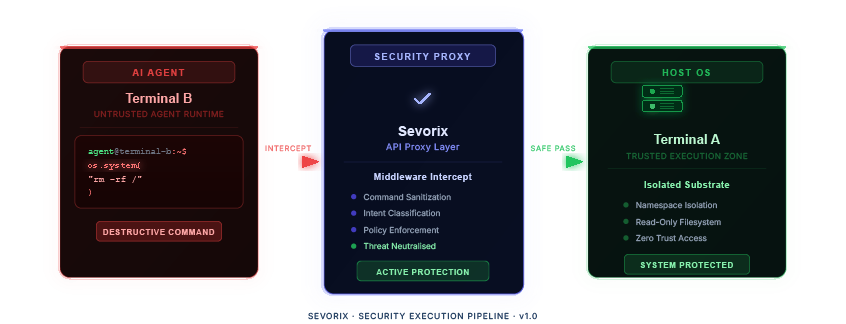
Sevorix acts as a local proxy (middleware) for your AI Agents. Instead of giving your agent direct access to subprocess.run or os.system, you route those requests through Sevorix.
1: Terminal A: Run Sevorix (./sevorix). It listens on http://localhost:3000.
2: Terminal B: Run your Agent. Configure its tools to hit the Sevorix API.
The simplest way to use Sevorix is a direct POST request.
from langchain.tools import tool
import requests
@tool
def secure_shell(command: str) -> str:
"""Executes shell commands safely via Sevorix firewall."""
# Check Sevorix first
check = requests.post("http://localhost:3000/analyze", json={"payload": command})
if check.status_code != 200:
return f"BLOCKED: {check.text}"
return f"Executed: {command}"
Wrap Sevorix as a Custom Tool in your agent definition.
import requests
def safe_command(command):
# Ask Sevorix for permission
try:
response = requests.post("http://localhost:3000/analyze", json={
"agent": "dev-agent-01",
"action": "execute",
"payload": command
})
if response.status_code == 200:
return run_system_command(command) # Safe
else:
return f"⛔ BLOCKED: {response.text}"
except Exception:
return "Error connecting to Sevorix Watchtower."